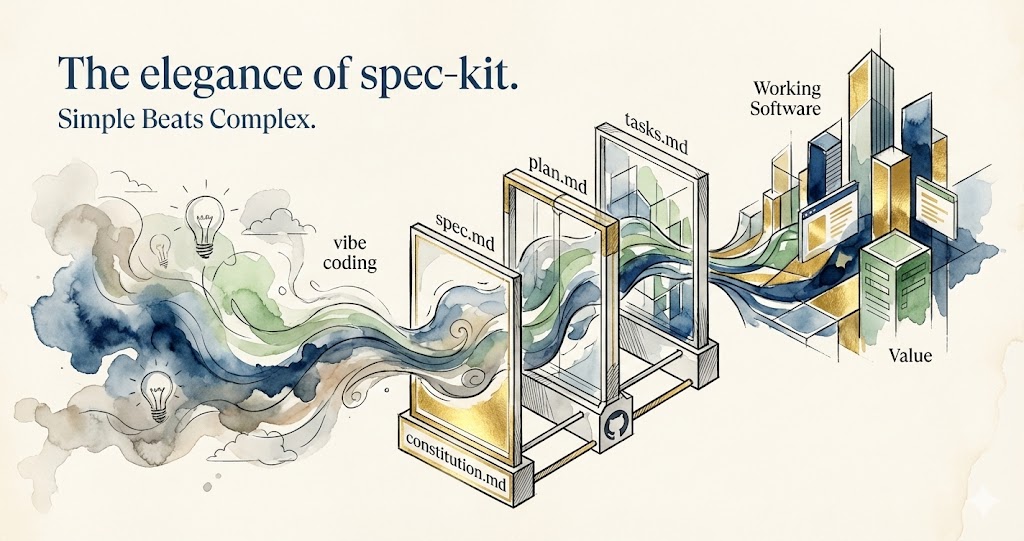
The Elegance of Spec-Kit: Simple Beats Complex Every Time
For the past three years, we've watched the world scramble to work with AI coding agents. Billions poured into complex frameworks. Elaborate orchestration systems. Sophisticated agent architectures promising to revolutionize how we build software.
Everyone was building bigger, more complex solutions to tame AI.
Then, in fall 2025, something unexpected happened.
Spec-Kit arrived. Four simple Markdown files. Five straightforward commands. No fancy frameworks. No complex abstractions. Just elegant specifications that AI agents could actually understand and execute flawlessly.
New to spec-driven development? Learn how this methodology achieves 95%+ first-pass accuracy →
"The best solutions don't add complexity. They dissolve it."
What makes Spec-Kit remarkable isn't just that it works for coding—though it has quietly become the standard for specification-driven development. It's that this elegant pattern works for everything. Marketing campaigns. Legal documents. Product launches. Financial analysis.
Curious how this methodology scales beyond code? Discover how spec-driven development transforms every role in your organization →
Spec-Kit didn't just solve AI coding. It revealed the most elegant way for humans to collaborate with any AI agent, in any domain.
And it did it with Markdown files you can read in any text editor.
What Is Spec-Kit?
Think of Spec-Kit as a conversation protocol between you and AI agents—except instead of endless back-and-forth, you have a structured dialogue that actually gets things done.
Here's the beautiful simplicity: You describe what you want in plain English. An AI agent figures out how to build it. And the entire process lives in four simple text files anyone can read.
No coding required. No technical jargon. Just clear thinking, written down.
How It Works (Even Non-Technical People Can Understand This)
Step 1: Write down your project's guiding principles "We value speed over perfection. Test everything. Keep it simple."
Step 2: Describe what you want to build "Users can upload photos, organize them into albums, and drag to reorder."
Step 3: Choose your technical approach "Use modern web tech, store nothing in the cloud, keep it fast."
Step 4: AI breaks it into specific tasks "Create database. Build upload feature. Add drag-and-drop..."
Step 5: AI executes every task, checking them off And you get working software.
The Radical Insight
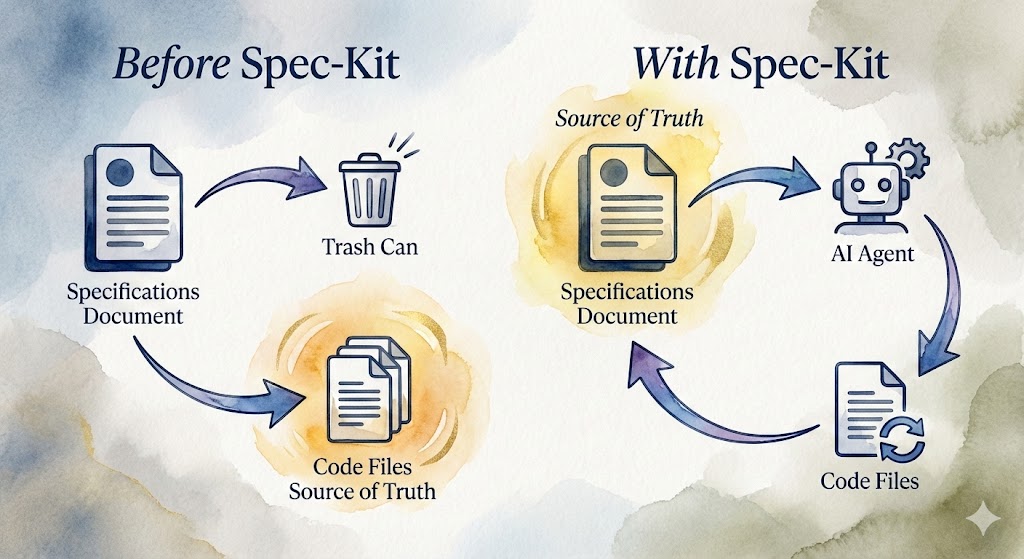
"For 60 years, we treated code as the product and specs as throwaway notes. Spec-Kit flips this: Specs are permanent. Code is disposable."
Before Spec-Kit: You write specifications → Build code → Throw specs away → Code is truth
With Spec-Kit: You write specifications → AI generates code → Specs remain truth → Regenerate code anytime
This isn't just a workflow change. It's a philosophical revolution in how we think about building anything complex.
When you need to modify your software, you don't hunt through code. You edit the specification—the source of truth—and regenerate. Clean. Predictable. Elegant.
The Architecture: Four Files That Do Everything
Here's where Spec-Kit's elegance truly shines. Most systems grow bloated—more features, more files, more complexity. Spec-Kit went the opposite direction.
Four files. That's the entire system.
"Perfection is achieved not when there is nothing more to add, but when there is nothing left to take away." — Antoine de Saint-Exupéry
File 1: constitution.md — Your Project's DNA
Think of it as: The non-negotiable engineering standards that every line of code must follow
What it does: Establishes immutable rules that both human developers and AI agents must obey
Written for: Everyone who touches the codebase—engineers, architects, code reviewers, AI agents
Real coding example:
# Constitution: Code Quality Principles

## Testing Requirements
- All code must have >80% unit test coverage
- Integration tests for cross-module interactions
...

## TypeScript Standards
- Strict mode enabled: no `any` types
- Const by default, let only when necessary
...

## Performance Constraints
- Page load target: <2 seconds (4G)
- First Contentful Paint: <1 second
...
Why this works:
When an AI agent starts implementing a feature, it reads this constitution first. If you ask it to build a user authentication system, it automatically:
- Uses TypeScript (no
any) - Creates JWT tokens with 15-minute expiry
- Writes unit tests with >80% coverage
- Sanitizes all inputs
- Returns JSON in the standard format
You never have to repeat these requirements. They're baked into the project's DNA.
This file is your project's law system—it automatically rejects anything that violates your engineering standards. An AI agent won't write insecure code, skip tests, or violate performance budgets, just like your law system won't accept wrong doing.
File 2: spec.md — What You're Building (And Why)
Think of it as: User stories and acceptance criteria that define success
What it does: Describes the functional requirements without mentioning tech stack
Written for: Product managers, stakeholders, QA testers, and developers
Real coding scenario:
You're building a real-time collaborative task board (think Trello, but simpler). Here's what your spec.md looks like:
# Specification: Collaborative Task Board

## Overview
A real-time task management system where teams can create projects,
add tasks, and move them between status columns (To Do, In Progress, Done).

## User Stories

### Story 1: Create Project
**As a** team lead
**I want to** create a new project with a name and description
**So that** my team can organize tasks by project

**Acceptance Criteria**:
- User can enter project name (required, max 100 chars)
- User can enter description (optional, max 500 chars)
- Project appears in project list immediately after creation
...

### Story 2: Add Task to Project
**As a** team member
**I want to** create tasks within a project
**So that** I can break down work into manageable pieces

**Acceptance Criteria**:
- User can create task with title (required, max 200 chars)
- User can assign task to team member (optional)
- Task starts in "To Do" column by default
...

### Story 3: Move Task Between Columns
**As a** team member
**I want to** drag tasks between columns
**So that** I can update task status visually

**Acceptance Criteria**:
- User can drag task from one column to another
- Task position updates immediately for all users (real-time)
...

## Edge Cases & Constraints

### Concurrency
- Two users dragging same task simultaneously: last write wins
- Task updates must sync to all connected clients within 500ms

### Performance
- Project must handle 100+ tasks without lag
- Page load time < 2 seconds even with 50 tasks visible
...
Notice what's NOT here:
- No mention of React, Vue, or Angular
- No database choices (Postgres, MongoDB, etc.)
- No tech stack discussions (REST vs GraphQL, WebSockets vs Server-Sent Events)
This spec is pure functionality. Any competent developer—or AI agent—should be able to build this using any technology stack.
The spec is written so clearly that your non-technical CEO can read it and understand exactly what the product does. Your QA tester can use it to write test cases. And your AI agent can build from it without confusion.
File 3: plan.md — The Technical Blueprint
Think of it as: Architecture decisions, tech stack, and implementation strategy
What it does: Translates functional requirements into concrete technical choices
Written for: Senior engineers, architects, tech leads
Real coding scenario (continuing the task board example):
# Implementation Plan: Collaborative Task Board

## Architecture Overview

**Pattern**: Monolithic backend + SPA frontend + real-time WebSocket layer

**Why this architecture**:
- Small team (2-3 devs), monolith reduces operational complexity
- Real-time requirement demands WebSocket connections
- SPA provides smooth drag-and-drop UX without page refreshes

## Tech Stack

### Frontend
- **Framework**: React 18 with TypeScript
- **State Management**: Zustand (lightweight, easier than Redux)
- **Drag-and-Drop**: @dnd-kit/core (better accessibility than react-beautiful-dnd)
- **Real-time**: Socket.IO client
- **Styling**: Tailwind CSS (rapid prototyping)
- **Build Tool**: Vite (fast dev server, < 1 second HMR)

### Backend
- **Runtime**: Node.js 20 LTS
- **Framework**: Express.js with TypeScript
- **Database**: PostgreSQL 15 (ACID guarantees for task operations)
- **Real-time**: Socket.IO server (WebSocket with fallback)
- **Authentication**: JWT (stateless, scales horizontally)
- **ORM**: Prisma (type-safe queries, auto-migrations)

### Infrastructure
- **Hosting**: Railway (backend), Vercel (frontend)
- **Database**: Railway PostgreSQL
- **CDN**: Cloudflare (asset caching)
- **Monitoring**: Sentry (error tracking), LogRocket (session replay)

## Data Model

```sql
-- Projects table
CREATE TABLE projects (
  id UUID PRIMARY KEY DEFAULT gen_random_uuid(),
  name VARCHAR(100) NOT NULL,
  description VARCHAR(500),
  owner_id UUID NOT NULL REFERENCES users(id),
  created_at TIMESTAMPTZ DEFAULT NOW(),
  archived BOOLEAN DEFAULT FALSE
);

-- Tasks table
CREATE TABLE tasks (
  id UUID PRIMARY KEY DEFAULT gen_random_uuid(),
  project_id UUID NOT NULL REFERENCES projects(id),
  title VARCHAR(200) NOT NULL,
  description TEXT,
  status VARCHAR(20) CHECK (status IN ('todo', 'in_progress', 'done')),
  assigned_to UUID REFERENCES users(id),
  position INTEGER NOT NULL, -- For ordering within column
  created_by UUID NOT NULL REFERENCES users(id),
  created_at TIMESTAMPTZ DEFAULT NOW(),
  updated_at TIMESTAMPTZ DEFAULT NOW()
);

-- Comments table
CREATE TABLE comments (
  id UUID PRIMARY KEY DEFAULT gen_random_uuid(),
  task_id UUID NOT NULL REFERENCES tasks(id),
  author_id UUID NOT NULL REFERENCES users(id),
  content TEXT NOT NULL CHECK (LENGTH(content) <= 1000),
  created_at TIMESTAMPTZ DEFAULT NOW(),
  edited_at TIMESTAMPTZ
);

CREATE INDEX idx_tasks_project ON tasks(project_id);
CREATE INDEX idx_tasks_status ON tasks(status);
CREATE INDEX idx_comments_task ON comments(task_id);

## Real-time Strategy

**Optimistic Updates**:
- When user drags task, update UI immediately (optimistic)
- Send move event to server
- If server rejects, revert UI change
- Prevents laggy UX on slow connections

**Conflict Resolution**:
- Last-write-wins for task moves
- Server assigns timestamps, clients respect server state
- If client state diverges, full refresh from server

## Performance Optimizations

1. **Virtual Scrolling**: For projects with 100+ tasks (react-window)
2. **Debounced Saves**: Batch text edits (e.g., description) with 500ms debounce
3. **Connection Pooling**: PostgreSQL connection pool (max 20 connections)
4. **Query Optimization**: Index on (project_id, status, position) for fast task queries
5. **Bundle Splitting**: Code-split routes with React.lazy()

## Testing Strategy

- **Unit Tests**: Utilities, hooks, state management (Vitest)
- **Integration Tests**: API endpoints (Supertest)
- **E2E Tests**: Critical flows (Playwright)
  - Create project → Add task → Drag to "Done" → Add comment
- **Load Testing**: 100 concurrent users (Artillery)

## Deployment

1. **Backend**: Railway auto-deploys from `main` branch
2. **Frontend**: Vercel auto-deploys from `main` branch
3. **Database Migrations**: Prisma migrations run in Railway pre-deploy hook
4. **Environment Variables**: Managed in Railway/Vercel dashboards
This plan answers every "how" question:
- How do we handle real-time? → WebSocket with Socket.IO
- How do we store data? → PostgreSQL with Prisma ORM
- How do we prevent conflicts? → Last-write-wins with timestamps
- How do we test? → Unit + Integration + E2E with specific tools
An AI agent reading this knows exactly what to build and which libraries to use.
File 4: tasks.md — The Execution Checklist
Think of it as: Atomic, dependency-ordered tasks with acceptance criteria
What it does: Breaks the implementation plan into executable steps
Written for: Developers (human or AI) executing the work
Real coding scenario (continuing the task board example):
# Task Breakdown: Collaborative Task Board

## Phase 1: Database & Authentication (Foundation)

### T001: Setup PostgreSQL database schema
**Files**: `prisma/schema.prisma`, `prisma/migrations/`
**Acceptance Criteria**:
- Schema defines users, projects, tasks, comments tables
- Foreign key relationships enforced
- Indexes created for project_id, task_id queries
- Migration runs without errors
**Dependencies**: None
**Estimate**: 2 hours

### T002: Implement JWT authentication
**Files**: `src/auth/jwt.ts`, `src/middleware/auth.ts`
**Acceptance Criteria**:
- `/auth/login` endpoint returns valid JWT
- JWT expires in 15 minutes (per constitution)
- Middleware validates JWT and attaches user to request
- Unit tests: 3 test cases (valid token, expired token, missing token)
**Dependencies**: T001
**Estimate**: 3 hours

### T003: Create user registration endpoint
**Files**: `src/routes/auth.ts`, `src/services/users.ts`
**Acceptance Criteria**:
- `POST /api/v1/auth/register` accepts email + password
- Password hashed with bcrypt (12 rounds)
- Duplicate email returns 400 error
- Returns JWT on successful registration
**Dependencies**: T001, T002
**Estimate**: 2 hours

---

## Phase 2: Project Management (Core CRUD)

### T004: Create projects API endpoint
**Files**: `src/routes/projects.ts`, `src/services/projects.ts`
**Acceptance Criteria**:
- `POST /api/v1/projects` creates project for authenticated user
- Name validation: required, max 100 chars
- Returns project with UUID, created_at timestamp
- Integration test: Create project → Verify in database
**Dependencies**: T002, T003
**Estimate**: 2 hours

### T005: List user's projects endpoint
**Files**: `src/routes/projects.ts`
**Acceptance Criteria**:
- `GET /api/v1/projects` returns projects owned by authenticated user
- Excludes archived projects by default
- Results ordered by created_at DESC
- Integration test: Create 3 projects → List returns 3 results
**Dependencies**: T004
**Estimate**: 1.5 hours

---

## Phase 3: Task Management (Kanban Logic)

### T006: Create task endpoint
**Files**: `src/routes/tasks.ts`, `src/services/tasks.ts`
**Acceptance Criteria**:
- `POST /api/v1/tasks` creates task in specified project
- Auto-assigns position (max position + 1 in column)
- Status defaults to 'todo'
- Returns task with all fields populated
**Dependencies**: T004
**Estimate**: 2.5 hours

### T007: Get tasks for project endpoint
**Files**: `src/routes/tasks.ts`
**Acceptance Criteria**:
- `GET /api/v1/projects/:id/tasks` returns all tasks for project
- Tasks grouped by status (todo, in_progress, done)
- Ordered by position within each status
- Query optimized with proper indexes (< 50ms for 100 tasks)
**Dependencies**: T006
**Estimate**: 2 hours

### T008: Update task status endpoint (for drag-and-drop)
**Files**: `src/routes/tasks.ts`, `src/services/tasks.ts`
**Acceptance Criteria**:
- `PATCH /api/v1/tasks/:id` updates status and position
- Recalculates positions for affected tasks in both columns
- Transaction ensures consistency (all position updates succeed or none)
- Returns updated task + affected tasks (for optimistic UI updates)
**Dependencies**: T006
**Estimate**: 4 hours

---

## Phase 4: Real-time WebSocket Layer

### T009: Setup Socket.IO server
**Files**: `src/socket/server.ts`, `src/socket/events.ts`
**Acceptance Criteria**:
- WebSocket server runs on port 3001
- CORS configured to allow frontend origin
- Connection authenticated via JWT in handshake
- Logs connections/disconnections
**Dependencies**: T002
**Estimate**: 2 hours

### T010: Implement join_project room subscription
**Files**: `src/socket/events.ts`
**Acceptance Criteria**:
- Client emits `join_project(projectId)` to subscribe
- Server validates user has access to project
- User joins Socket.IO room for that project
- All subsequent task updates broadcast to room members
**Dependencies**: T009
**Estimate**: 2 hours

### T011: Broadcast task moves in real-time
**Files**: `src/socket/events.ts`, `src/services/tasks.ts`
**Acceptance Criteria**:
- When task status/position changes via API, emit `task_moved` event
- Event payload includes full task object + affected tasks
- All clients in project room receive event within 500ms
- Integration test: Two clients, one moves task, other receives update
**Dependencies**: T008, T010
**Estimate**: 3 hours

---

## Phase 5: Frontend Components

### T012: Build TaskBoard React component
**Files**: `src/components/TaskBoard/TaskBoard.tsx`, `src/components/TaskBoard/Column.tsx`
**Acceptance Criteria**:
- TaskBoard renders 3 columns (To Do, In Progress, Done)
- Fetches tasks on mount via API
- Columns display tasks grouped by status
- Styled with Tailwind CSS (matches design mockup)
**Dependencies**: T007
**Estimate**: 3 hours

### T013: Implement drag-and-drop with @dnd-kit
**Files**: `src/hooks/useDragDrop.ts`, `src/components/TaskBoard/TaskCard.tsx`
**Acceptance Criteria**:
- Tasks draggable between columns
- Shows ghost preview during drag
- Calls API to update task status on drop
- Optimistic UI update (moves task immediately, reverts on error)
- Keyboard accessible (per constitution)
**Dependencies**: T012
**Estimate**: 5 hours

### T014: Integrate WebSocket for real-time updates
**Files**: `src/hooks/useWebSocket.ts`, `src/stores/taskStore.ts`
**Acceptance Criteria**:
- Connects to Socket.IO server on component mount
- Subscribes to project room via `join_project`
- Listens for `task_moved` events and updates Zustand store
- Handles reconnection on connection loss
**Dependencies**: T010, T012
**Estimate**: 4 hours

### T015: Build CommentThread component
**Files**: `src/components/TaskDetail/CommentThread.tsx`
**Acceptance Criteria**:
- Displays comments with author name + timestamp
- Input field for new comments (max 1000 chars)
- "Edit" button shows for own comments (< 5 min old)
- "Delete" button shows for own comments
- Markdown rendering support
**Dependencies**: T012
**Estimate**: 4 hours

---

## Phase 6: Testing & Deployment

### T016: Write E2E tests for critical flow
**Files**: `tests/e2e/task-management.spec.ts`
**Acceptance Criteria**:
- Test: Register → Login → Create project → Add task → Drag to Done → Add comment
- Runs in headless Chrome via Playwright
- Passes in CI environment
- Test duration < 30 seconds
**Dependencies**: T015
**Estimate**: 3 hours

### T017: Setup Railway deployment
**Files**: `railway.toml`, `.github/workflows/deploy.yml`
**Acceptance Criteria**:
- Backend deploys to Railway on push to main
- Database migrations run automatically in pre-deploy hook
- Environment variables configured (JWT_SECRET, DATABASE_URL)
- Health check endpoint `/health` returns 200
**Dependencies**: T016
**Estimate**: 2 hours

### T018: Setup Vercel deployment
**Files**: `vercel.json`
**Acceptance Criteria**:
- Frontend deploys to Vercel on push to main
- Environment variables configured (API_URL, SOCKET_URL)
- Build completes in < 2 minutes
- Production URL accessible and serves app
**Dependencies**: T017
**Estimate**: 1 hour

---

## Execution Notes

- **Total estimate**: 48.5 hours (~1.5 weeks for 1 developer)
- **Critical path**: T001 → T002 → T004 → T006 → T008 → T011 → T012 → T013 → T014
- **Parallelizable**: T015 (comments) can be built in parallel with T011-T014
- **Quality gates**: All tests must pass before T017 (deployment)
What makes this effective:
Each task is:
- Atomic: Can be completed in one focused session (1-5 hours)
- Specific: Names exact files to create/modify
- Testable: Clear acceptance criteria
- Ordered: Dependencies explicitly listed
- Estimated: Time estimates for planning
An AI agent can read this file, execute tasks sequentially, check them off, and build the entire application without asking for clarification.
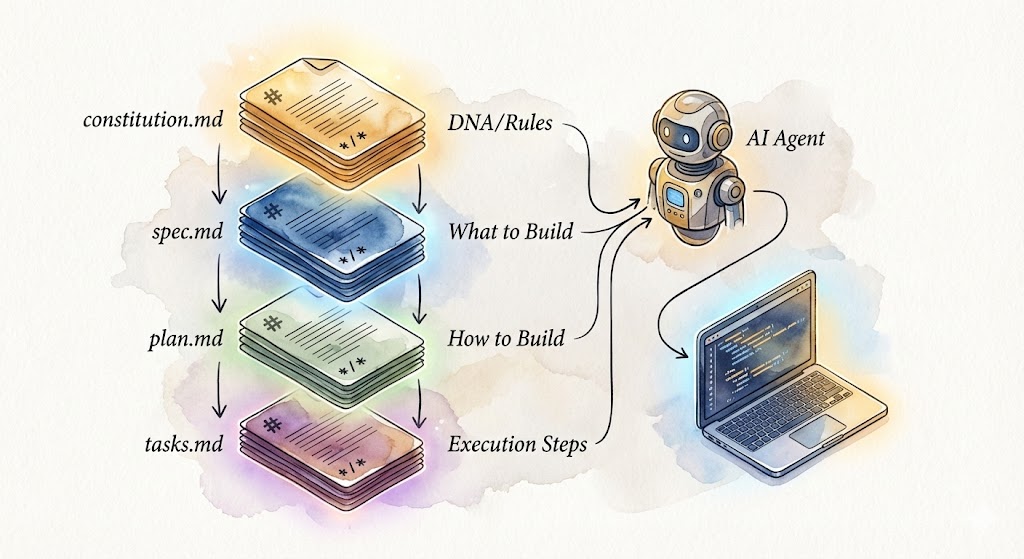
That's it. Four files.
No configuration hell. No framework lock-in. No proprietary formats. Just Markdown files that anyone can read, edit, and version control.
"Complexity is easy. Simplicity is hard. Spec-Kit chose the hard path—and made it look effortless."
The Workflow: Five Commands
Spec-Kit introduces a sequential workflow:
| Step | Command | What Happens |
|---|---|---|
| 1 | /speckit.constitution |
Define project principles and constraints |
| 2 | /speckit.specify |
Describe what you're building (user stories, requirements) |
| 3 | /speckit.plan |
Define technical approach (architecture, tech stack) |
| 4 | /speckit.tasks |
AI breaks plan into atomic, executable tasks |
| 5 | /speckit.implement |
AI executes each task, checking them off |
The key insight: Each step builds on the previous one. The AI agent never starts from scratch—it always has full context.
Example: From Idea to Shipped
Here's what the workflow looks like in practice:
You write:
Build a photo album app using React and PostgreSQL.
Users can create albums, upload photos, and drag to reorder.
Step 1: Constitution (/speckit.constitution)
# Constitution: Code Quality

- TypeScript strict mode, no `any`
- >80% test coverage required
- All public APIs documented with JSDoc
Step 2: Specification (/speckit.specify)
# Specification: Photo Album

User can:
- Create albums with name and description
- Upload up to 1000 photos per album
- Drag and drop to reorder photos
- View albums on desktop and mobile
Step 3: Plan (/speckit.plan)
# Implementation Plan

Frontend: React 18 + TypeScript + Vite
Backend: Node.js + Express + PostgreSQL
Deployment: Vercel (frontend), Railway (backend)
Step 4: Tasks (/speckit.tasks)
# Tasks (auto-generated)

- [ ] T001: Create PostgreSQL schema for users, albums, photos
- [ ] T002: Create User authentication endpoints
- [ ] T003: Create Album CRUD API
- [ ] T004: Create Photo upload endpoint
- [ ] T005: Build AlbumList React component
- [ ] T006: Build PhotoGrid React component with drag/drop
Step 5: Implement (/speckit.implement)
AI executes each task in order. Result: A working photo album app—built from specifications, not improvisation.
"Stop vibe coding. Start specifying."
Why This Design Is Elegant
Elegance isn't about being fancy. It's about doing more with less. Spec-Kit embodies this in ways that make other frameworks look wasteful.
1. It's Just Markdown (And That's the Genius)
"The most powerful tool is the one that speaks both languages—human and machine—with the same words."
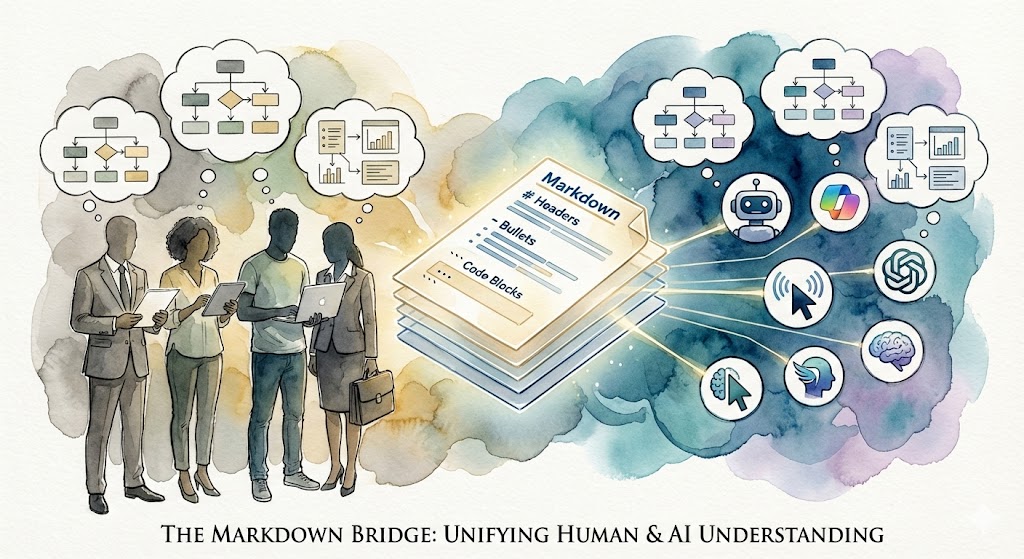
Markdown isn't just a text format. It's a cognitive architecture for organizing context into layers.
Here's the profound insight: LLM-based AI agents parse and understand Markdown the same way humans do. Headings create hierarchy. Lists create structure. Sections create boundaries. Emphasis creates importance.
When you write:
## User Stories

### Story 1: Upload Photos
- User can drag and drop
- Supports JPG, PNG (max 20MB)
- Shows upload progress
Both humans and AI agents see:
- A major section called "User Stories"
- A specific story about photo uploads
- Three concrete requirements with clear constraints
The same structure. The same meaning. No translation layer.
This is why Spec-Kit is elegant: Markdown is the universal language that both humans and AI agents read natively. Not XML that machines parse but humans struggle with. Not natural language prose that humans understand but AI agents misinterpret. Markdown sits perfectly in the middle—structured enough for AI, readable enough for humans.
But here's what makes this truly revolutionary:
Markdown's hierarchical structure separates context into layers that mirror how both humans and AI agents think:
- Headers (# ## ###) = Conceptual layers (high-level → detailed)
- Lists and checkboxes = Tasks and priorities
- Code blocks = Technical specifics
- Blockquotes = Principles and constraints
- Horizontal rules = Phase boundaries
This layered structure gives AI agents the exact same contextual scaffolding that humans use to navigate complex information. An AI agent reading spec.md doesn't see a blob of text—it sees organized thought.
And then the magic happens:
Because Markdown is equally readable by humans and AI agents, it becomes the perfect filing system for human-AI collaboration.
- Your CEO can read it: No decoder ring required
- Your designer can edit it: No coding skills needed
- Your lawyer can review it: Audit trail lives in Git
- Your AI agent can execute from it: Same file, zero translation
One format. Two audiences. Perfect fidelity.
This is the mechanism that makes human-AI collaboration actually work. Not API calls. Not prompt engineering. Not complex agent orchestration frameworks. Just shared documents that both parties read the same way.
Try building that with JSON. Or proprietary formats. Or tools that shut down in three years.
Markdown isn't just elegant. It's the universal interface between human intention and machine execution.
"Markdown is the new code. Specs are the new source files."
2. It's Modular and Reusable (Like LEGO Blocks)
Each file has one job. Do it well. Nothing else.
This creates unexpected power:
- Swap the spec, keep the constitution → Different projects, same principles
- Reuse the constitution across 50 projects → One source of truth for your entire company
- Fork someone else's constitution → "This startup's quality standards are amazing. Let's copy them."
- Share templates publicly → The "YC Application Kit," "McKinsey Analysis Kit," "Sequoia Pitch Kit"
Want to see how this scales across marketing, legal, HR, and more? Learn how every role can use this same methodology →
Real example: A company creates a "Data Privacy Constitution" once. Every project inherits it automatically. When regulations change, update one file—every project stays compliant.
"The constitution is the new intellectual property."
Senior experts encode their knowledge into constitution.md. That knowledge becomes:
- Transferable: New team members inherit 20 years of wisdom on Day 1
- Scalable: AI agents follow the same expert rules every single time
- Valuable: A world-class constitution is worth more than the code it generates
3. It Works with 16+ AI Agents (And Counting)
You're not betting on one AI vendor. You're betting on specifications.
Spec-Kit supports:
- Claude Code (Anthropic)
- GitHub Copilot (Microsoft)
- Cursor, Windsurf, Gemini CLI
- Qwen Code, Codex CLI, Roo Code
- And 8+ more agents
Why this matters:
Remember when everyone built iPhone apps, then had to rewrite everything for Android? Spec-Kit prevents that.
Write your specifications once. Switch AI agents anytime. The specs are portable. The knowledge is permanent. The implementation is replaceable.
"In a world where AI models change every 6 months, specifications are the only durable asset."
4. It Enforces Structure Without Being Heavy
Most frameworks demand elaborate setup. Config files. Build tools. Runtime dependencies. Plugin ecosystems. Update treadmills.
Spec-Kit's requirements:
- Git (you already have it)
- Markdown files (you already know how to write them)
- Your favorite AI agent (pick one)
That's it.
No npm install with 500 dependencies. No framework updates breaking your project. No debugging configuration files longer than your actual code.
"Clear inputs produce correct outputs. The highest-leverage activity isn't finding better AI. It's learning to specify better."
"Markdown is the new code. Specs are the new source files."
What's Next? Start Building Today
The elegance of Spec-Kit isn't theoretical. It's immediately useful.
Try Spec-Kit for Software Development
Clone the official GitHub repository and start your first spec-driven project:
Follow the 5-step workflow. See your specifications compile into working software.
Explore Kit Variants for Other Domains
Spec-Kit works for more than code. Discover specialized kits for product management, marketing, legal work, and more:
Explore Kits at kits.agentii.ai →
Find your domain. Adapt the pattern. Orchestrate AI agents with elegance.
The future of work isn't more complexity. It's radical simplicity.
Four files. Five commands. Infinite possibilities.
That's the elegance of Spec-Kit.
Last updated: November 29, 2025
Frequently Asked Questions
Q: Why Markdown instead of JSON or YAML?
A: Because your CEO can read Markdown. Your designer can edit it. Your lawyer can review it. Try that with a JSON schema. Markdown is universal, human-friendly, and Git-native. The simplest tool that works is always the right tool.
Q: Can I use Spec-Kit without AI agents?
A: Absolutely. Humans can read specs and implement from them too—we've been doing it for decades. AI agents just make execution faster and more consistent. The methodology works either way.
Q: How detailed should my specifications be?
A: Detailed enough that two different people building independently would produce nearly identical results. If you're unsure whether something is clear, it's not clear enough. Ambiguity is the enemy of elegance.
Q: What if requirements change mid-project?
A: Update the spec. The spec is the source of truth. Code follows the spec. If code has drifted from the spec, that's a bug in the code, not the spec. This is the fundamental mindset shift Spec-Kit requires.
Q: Is this just waterfall development in disguise?
A: No. Waterfall says "plan everything upfront, then never change it." Spec-Kit says "specify clearly, then iterate the spec as you learn." The specification evolves, but the process remains predictable. That's specification-driven iteration, not waterfall rigidity.
Q: Can I use Spec-Kit with existing codebases?
A: Yes. Extract your existing code's principles into a constitution.md. Write specs for new features going forward. Over time, regenerate or refactor old code to match the specs. You can adopt Spec-Kit incrementally—no need to rewrite everything on Day 1.
Q: How long does it take to learn Spec-Kit?
A: 2-4 hours to understand the philosophy. 1-2 weeks to internalize the workflow on a real project. 2-3 months to reach mastery. But you'll benefit from Day 1—even an imperfect spec is better than no spec.
Last updated: November 29, 2025
Agentii-Kit Team
Expert contributor to the Agentii blog sharing insights on AI-powered financial analysis and automation.
Related Articles
Don't Code. Specify: How Spec-Driven Development Gets 95% Accuracy on the First Try
Why spec-driven development hits 95% first-pass accuracy—and how to shift from vibe coding to a specification-first workflow.
Three Domains, One Method: How Spec-Driven Workflows Are Transforming Product, Content, and Marketing
How PMF‑Kit, Blog‑Tech‑Kit, and Twitter‑Init‑Kit use one spec‑driven method to transform product, content, and marketing into agent‑ready workflows.
Every Job. One Method: Spec-Driven Development Beyond Code
Discover how spec-driven development transforms every role—from marketing to legal to HR. Learn why the same methodology works for any knowledge work.